 by
by INTRODUCTION
Excel is one of the most useful tools for students and professionals who work with data, reports, accounts, business information, or office tasks. While basic Excel can help you create tables and perform simple calculations, Advanced Excel takes your skills much further.
With advanced features such as Pivot Tables, advanced formulas, data validation, dashboards, conditional formatting, and data analysis tools, Excel can become a powerful solution for handling large amounts of information.
But with so many courses and training options available, one question often comes up: How do you choose the best Advanced Excel course?
If you are a beginner, student, job seeker, or working professional, here are some important factors you should consider before joining an Advanced Excel course.
1. Understand What You Want to Learn
Before choosing a course, first understand your own learning requirements.
If you are completely new to Excel, look for a course that starts with the fundamentals before moving towards advanced concepts. You should understand worksheets, formatting, basic formulas, cell references, sorting, filtering, and simple functions before learning complex techniques.
Students who already know basic Excel can focus more on topics such as:
- VLOOKUP, XLOOKUP and INDEX-MATCH
- IF and nested IF functions
- Pivot Tables and Pivot Charts
- Data validation
- Conditional formatting
- Advanced data filtering
- Excel dashboards
- Data cleaning and analysis
- Logical and lookup functions
- Basic automation and productivity techniques
A good course should follow a logical learning path rather than simply covering a long list of Excel functions.
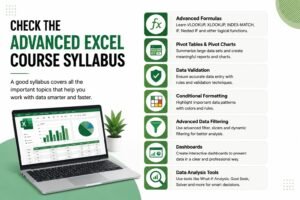
2. Check the Advanced Excel Course Syllabus
The syllabus is one of the most important things to check before enrolling.
A course may be advertised as “Advanced Excel,” but that does not always mean it covers the skills required in real workplaces.
Look for a syllabus that combines Excel formulas, data analysis, reporting, dashboards, and practical projects.
For students interested in local training, searching for an ms excel course in yamuna vihar can help identify nearby learning options. However, don’t select a course only because of its location. Compare the syllabus, practical training, faculty experience, and learning support as well.
3. Look for Practical Training
Excel is a practical skill. Watching someone demonstrate formulas is not enough—you need to use them yourself.
A useful training program should provide exercises based on realistic situations such as sales reports, employee records, expense sheets, inventory data, financial reports, or business dashboards.
Practical assignments can help students understand how Excel is actually used in offices.
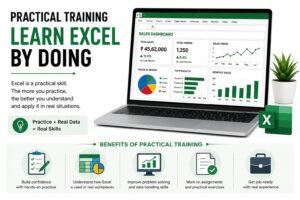
If you are comparing MS Excel Training in yamuna vihar, check whether students receive hands-on assignments and projects instead of only theoretical explanations.
4. Choose Training That Includes Real-World Projects
Projects are particularly valuable for students and freshers.
Suppose you learn Pivot Tables in a classroom. You may understand the concept, but creating a complete sales dashboard using a real-looking dataset gives you much stronger practical knowledge.
A good Advanced Excel course may include projects involving:
- Sales and revenue analysis
- Attendance or employee reports
- Expense management
- Inventory tracking
- Business dashboards
- Customer data analysis
- Monthly performance reports
These projects can also give you examples to discuss during interviews.
5. Consider the Trainer’s Experience
The quality of teaching can make a major difference in your learning experience.
An experienced trainer should be able to explain difficult Excel concepts in simple language and demonstrate how different functions can be used together.
Instead of selecting a course only because it is advertised as an MS ExcelTraining Institute in yamuna vihar, try to understand who will teach you, whether doubt sessions are available, and whether the trainer focuses on practical applications.
A good instructor should encourage students to solve problems independently instead of simply following instructions.
6. Check Whether the Course Covers MIS Skills
Advanced Excel is commonly used in MIS (Management Information System) work for preparing reports, organizing information, analysing data, and presenting business performance.
If you are interested in MIS-related jobs, look for a course that includes reporting, data organization, formulas, Pivot Tables, dashboards, and data analysis.
This is why students searching for a mis training institute in yamuna vihar should also check the Excel syllabus carefully. Strong Excel skills can provide a useful foundation for many reporting and data-related roles.
You may also come across an Advanced MS ExcelTraining Institute in uttam nagar while comparing local options. Again, the course content and practical learning opportunities should be more important than the promotional claims.
7. Check Certification and Career Support
A certificate can be useful as supporting evidence of training, particularly for students and freshers. However, a certificate alone will not make you proficient in Excel.
Your actual skills matter more.
Look for training that helps you build practical confidence and, where available, provides interview preparation, resume guidance, projects, or career support.
During an interview, being able to explain how you created a dashboard, analysed data, or solved an Excel problem can be much more valuable than simply mentioning a certificate.
8. Choose a Course That Matches Your Career Goal
Finally, think about where you want to use Excel.
Advanced Excel can be useful in areas such as:
- MIS and reporting
- Finance and accounting
- Sales and marketing
- Human resources
- Operations
- Administration
- Data analysis
- Business management
You don’t need to become an Excel expert overnight. Start with the basics, understand how spreadsheets work, and gradually move towards advanced functions, reporting, dashboards, and data analysis.
Final Thoughts
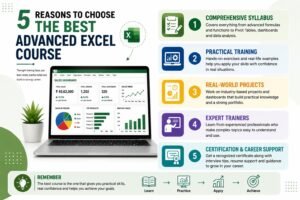
Choosing the best Advanced Excel course is not simply about finding the cheapest course or the institute closest to your home. The right program should provide a structured syllabus, practical assignments, experienced instruction, real-world projects, and skills that match your career goals.
Whether you are exploring MS Excel Classes in yamuna vihar or looking for advanced Excel training in uttam nagar, take some time to compare the curriculum and learning experience before enrolling.
For students and freshers, Advanced Excel can be a valuable career skill because it is used across many departments and industries. With consistent practice and the right training, you can move from simply knowing Excel to confidently using it for professional reporting, analysis, and decision-making.visit us